TryGhost/Ghost architecture diagram
How TryGhost/Ghost is built, drawn from its code at ed222eb on 2026-11-08 by Plotix's agent.
Domain model
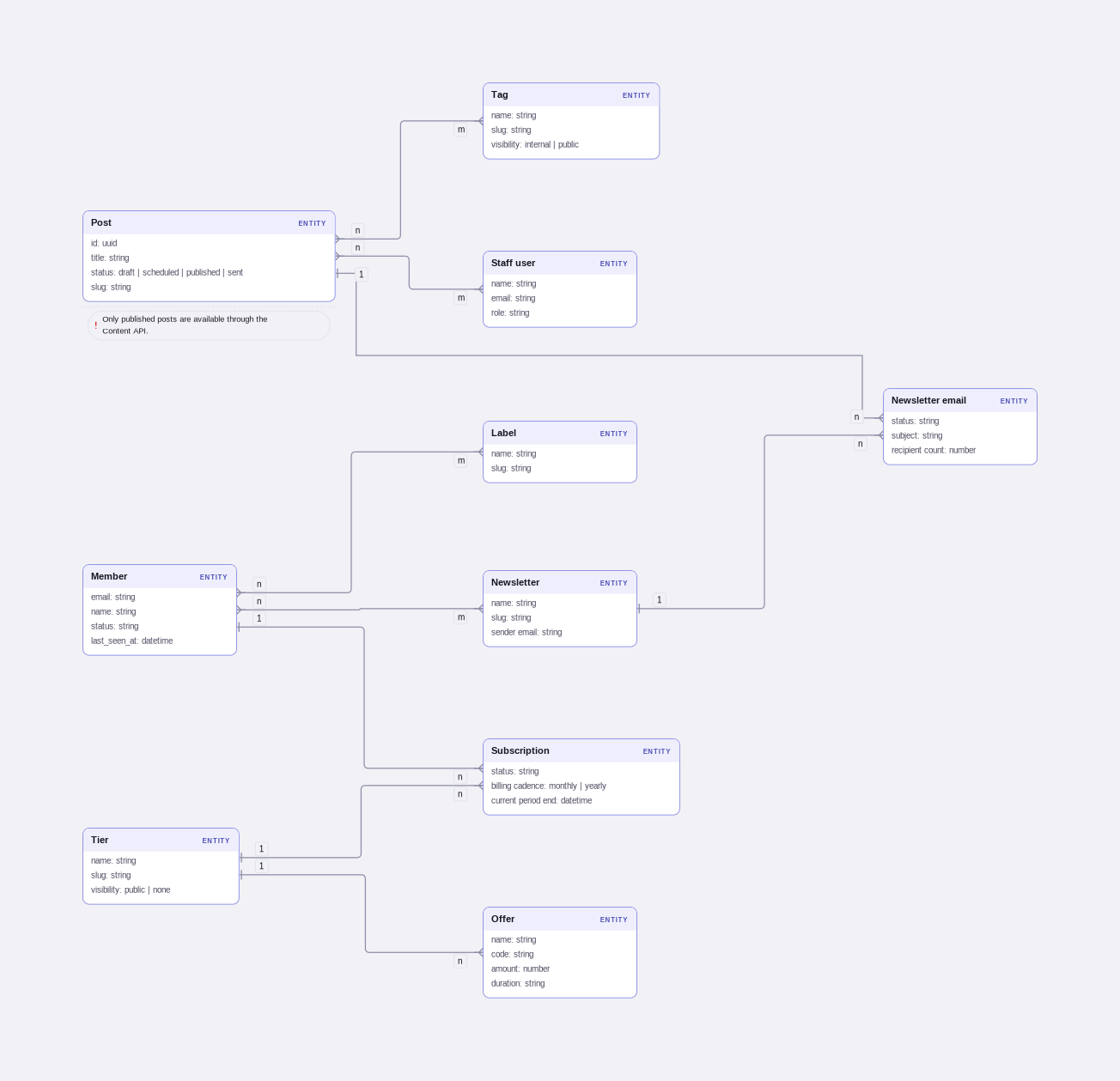
What the core data is: content, readers, tiers and email sends, as stored by Ghost Core.
Open the picture for full size (SVG).
Parts
- Post
id: uuid · title: string · status: draft | scheduled | published | sent · slug: string - Tag
name: string · slug: string · visibility: internal | public - Staff user
name: string · email: string · role: string - Member
email: string · name: string · status: string · last_seen_at: datetime - Label
name: string · slug: string - Newsletter
name: string · slug: string · sender email: string - Tier
name: string · slug: string · visibility: public | none - Subscription
status: string · billing cadence: monthly | yearly · current period end: datetime - Offer
name: string · code: string · amount: number · duration: string - Newsletter email
status: string · subject: string · recipient count: number
How they connect
- Post → Tag
- Post → Staff user
- Member → Label
- Member → Newsletter
- Member → Subscription
- Tier → Subscription
- Tier → Offer
- Post → Newsletter email
- Newsletter → Newsletter email
System components
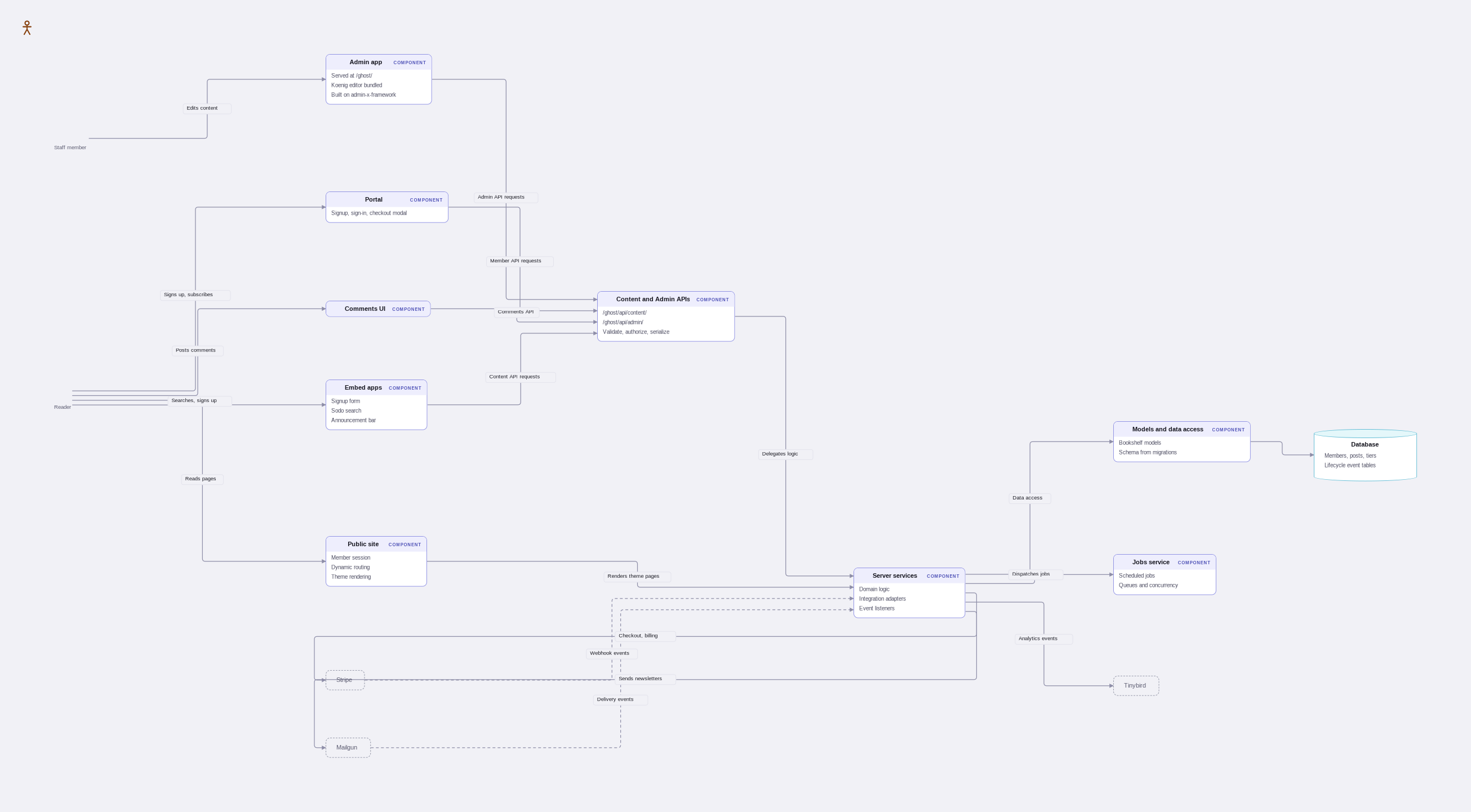
What talks to what at runtime: Ghost Core in one process, the browser apps, the database and third-party services.
Open the picture for full size (SVG).
Parts
- Staff member
- Reader
- Admin app
Served at /ghost/ · Koenig editor bundled · Built on admin-x-framework - Portal
Signup, sign-in, checkout modal - Comments UI
- Embed apps
Signup form · Sodo search · Announcement bar - Public site
Member session · Dynamic routing · Theme rendering - Content and Admin APIs
/ghost/api/content/ · /ghost/api/admin/ · Validate, authorize, serialize - Server services
Domain logic · Integration adapters · Event listeners - Models and data access
Bookshelf models · Schema from migrations - Jobs service
Scheduled jobs · Queues and concurrency - Database
Members, posts, tiers · Lifecycle event tables - Stripe
- Mailgun
- Tinybird
How they connect
- Staff member → Admin app Edits content
- Reader → Public site Reads pages
- Reader → Portal Signs up, subscribes
- Reader → Comments UI Posts comments
- Reader → Embed apps Searches, signs up
- Admin app → Content and Admin APIs Admin API requests
- Portal → Content and Admin APIs Member API requests
- Comments UI → Content and Admin APIs Comments API
- Embed apps → Content and Admin APIs Content API requests
- Public site → Server services Renders theme pages
- Content and Admin APIs → Server services Delegates logic
- Server services → Models and data access Data access
- Models and data access → Database
- Server services → Jobs service Dispatches jobs
- Server services → Stripe Checkout, billing
- Stripe → Server services Webhook events
- Server services → Mailgun Sends newsletters
- Mailgun → Server services Delivery events
- Server services → Tinybird Analytics events
Newsletter sending
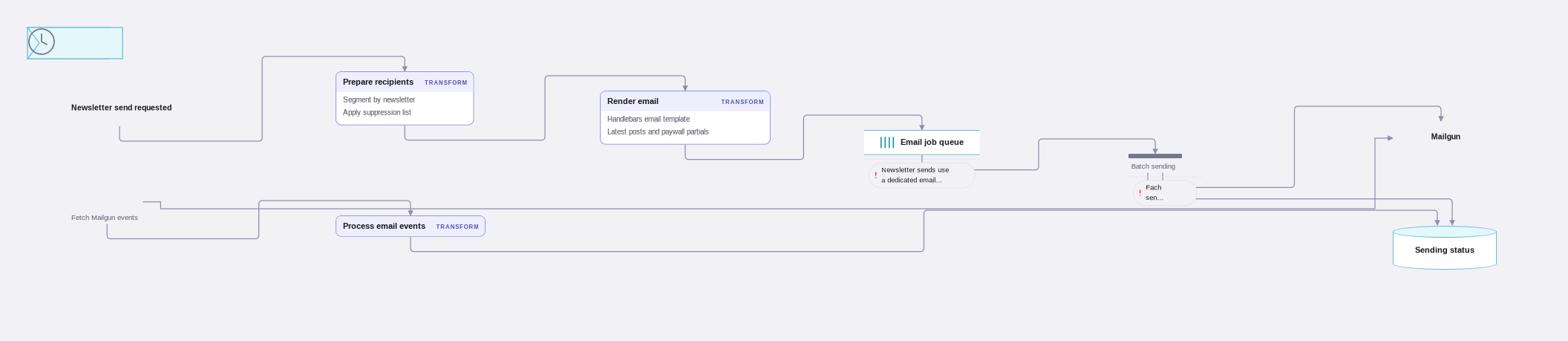
How a published post becomes a newsletter email, from recipients to Mailgun and back to delivery status.
Open the picture for full size (SVG).
Parts
- Newsletter send requested
- Prepare recipients
Segment by newsletter · Apply suppression list - Render email
Handlebars email template · Latest posts and paywall partials - Email job queue
- Batch sending
- Mailgun
- Fetch Mailgun events
- Process email events
- Sending status
How they connect
- Newsletter send requested → Prepare recipients
- Prepare recipients → Render email
- Render email → Email job queue
- Email job queue → Batch sending
- Batch sending → Mailgun
- Fetch Mailgun events → Mailgun
- Fetch Mailgun events → Process email events
- Process email events → Sending status
- Batch sending → Sending status
Post lifecycle
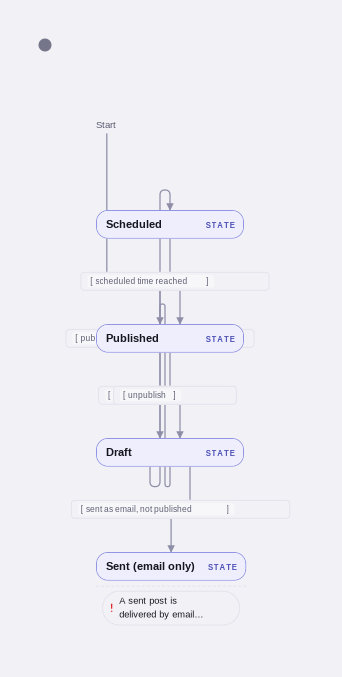
The statuses a post moves through: draft, scheduled, published and sent.
Open the picture for full size (SVG).
Parts
- Start
- Draft
- Scheduled
- Published
- Sent (email only)
How they connect
- Start → Draft
- Draft → Scheduled
- Draft → Published
- Scheduled → Published
- Draft → Sent (email only)
- Published → Draft
Publishing a post
The request path when staff publish a post from Admin, including the newsletter job.
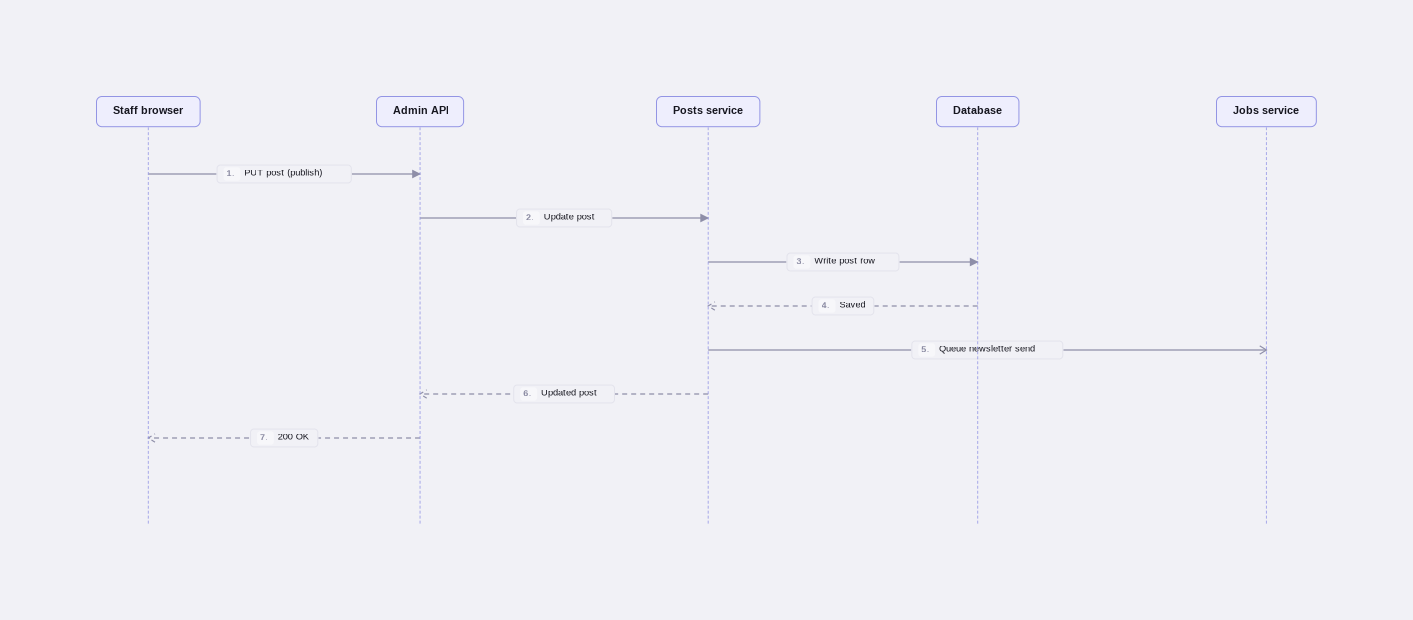
Open the picture for full size (SVG).
Parts
- Staff browser
- Admin API
- Posts service
- Database
- Jobs service
How they connect
- Staff browser → Admin API PUT post (publish)
- Admin API → Posts service Update post
- Posts service → Database Write post row
- Database → Posts service Saved
- Posts service → Jobs service Queue newsletter send
- Posts service → Admin API Updated post
- Admin API → Staff browser 200 OK
Draw your own repo
Plotix's agent reads your code and draws its architecture, and the diagram warns you when the code moves on.
Try Plotix