umami-software/umami architecture diagram
How umami-software/umami is built, drawn from its code at 559e3c6 on 2026-11-08 by Plotix's agent.
Data model
Main entities of Umami and how they relate. Derived from prisma/schema.prisma.
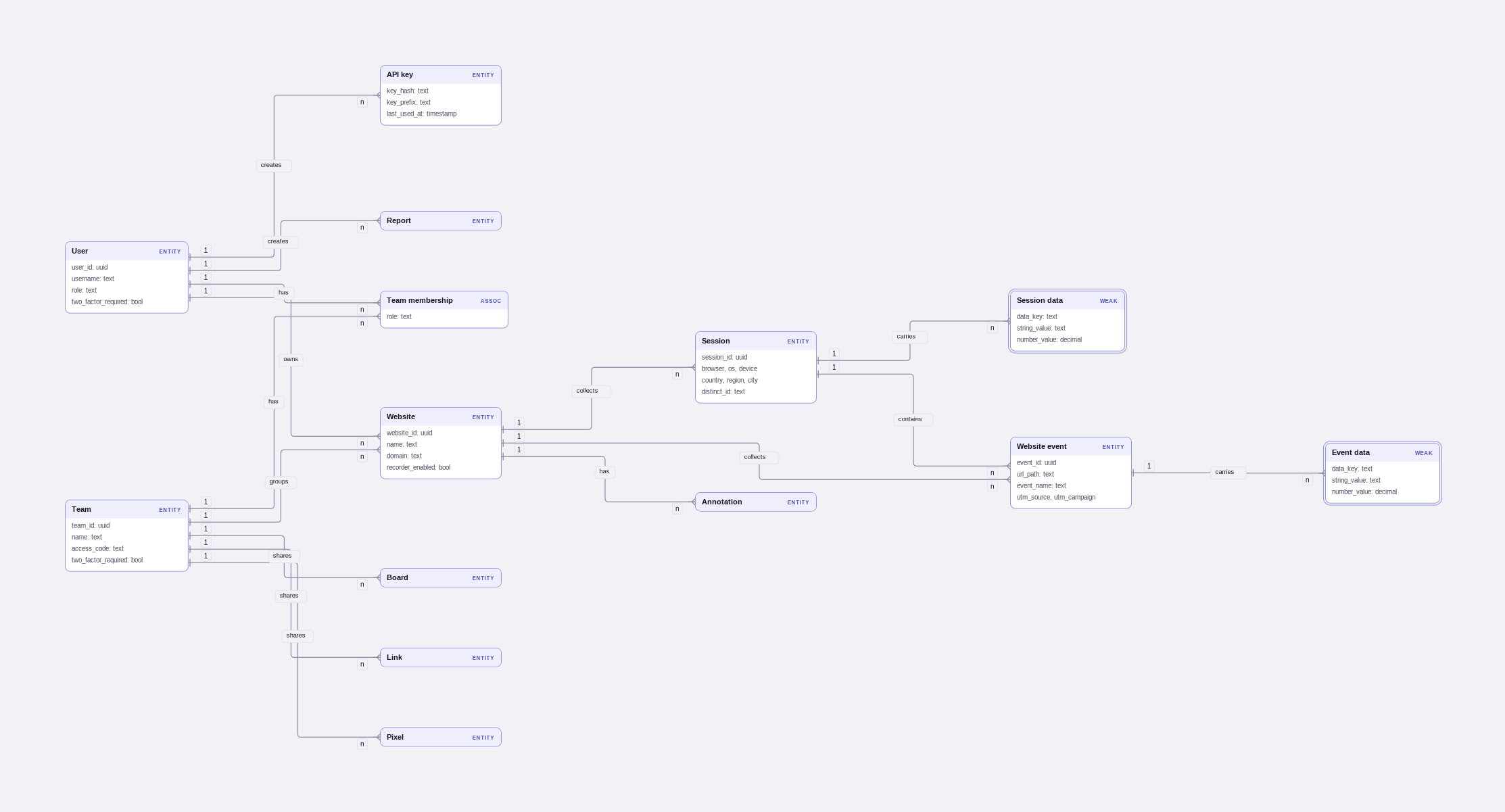
Open the picture for full size (SVG).
Parts
- User
user_id: uuid · username: text · role: text · two_factor_required: bool - Team
team_id: uuid · name: text · access_code: text · two_factor_required: bool - Team membership
role: text - API key
key_hash: text · key_prefix: text · last_used_at: timestamp - Website
website_id: uuid · name: text · domain: text · recorder_enabled: bool - Session
session_id: uuid · browser, os, device · country, region, city · distinct_id: text - Website event
event_id: uuid · url_path: text · event_name: text · utm_source, utm_campaign - Event data
data_key: text · string_value: text · number_value: decimal - Session data
data_key: text · string_value: text · number_value: decimal - Board
- Report
- Link
- Pixel
- Annotation
How they connect
- User → Team membership has
- Team → Team membership has
- User → Website owns
- Team → Website groups
- User → API key creates
- User → Report creates
- Team → Board shares
- Team → Link shares
- Team → Pixel shares
- Website → Session collects
- Website → Website event collects
- Session → Website event contains
- Website event → Event data carries
- Session → Session data carries
- Website → Annotation has
Architecture
Runtime parts of Umami and how they talk to each other.
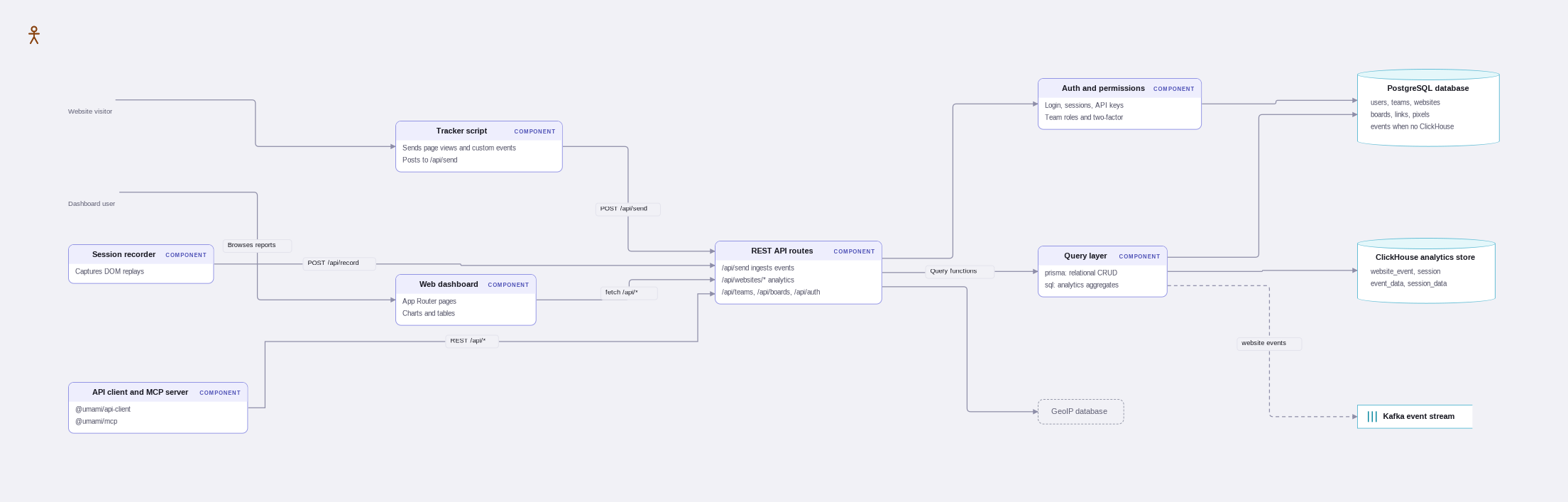
Open the picture for full size (SVG).
Parts
- Website visitor
- Dashboard user
- Tracker script
Sends page views and custom events · Posts to /api/send - Web dashboard
App Router pages · Charts and tables - REST API routes
/api/send ingests events · /api/websites/* analytics · /api/teams, /api/boards, /api/auth - Session recorder
Captures DOM replays - Auth and permissions
Login, sessions, API keys · Team roles and two-factor - Query layer
prisma: relational CRUD · sql: analytics aggregates - API client and MCP server
@umami/api-client · @umami/mcp - PostgreSQL database
users, teams, websites · boards, links, pixels · events when no ClickHouse - ClickHouse analytics store
website_event, session · event_data, session_data - Kafka event stream
- GeoIP database
How they connect
- Website visitor → Tracker script
- Dashboard user → Web dashboard Browses reports
- Tracker script → REST API routes POST /api/send
- Web dashboard → REST API routes fetch /api/*
- API client and MCP server → REST API routes REST /api/*
- Session recorder → REST API routes POST /api/record
- REST API routes → Auth and permissions
- REST API routes → Query layer Query functions
- Auth and permissions → PostgreSQL database
- Query layer → PostgreSQL database
- Query layer → ClickHouse analytics store
- Query layer → Kafka event stream website events
- REST API routes → GeoIP database
Deployment
How the self-hosted stack runs with docker-compose.
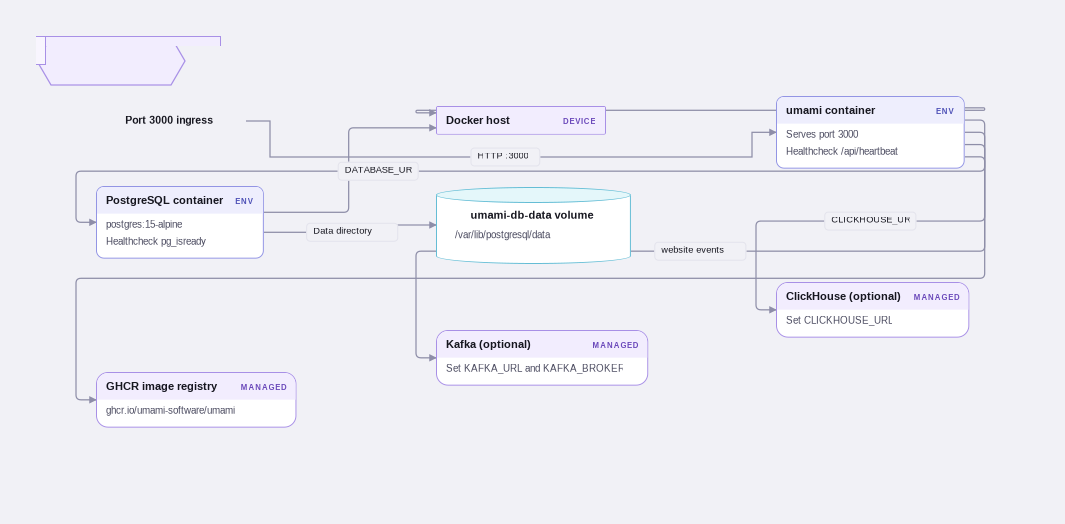
Open the picture for full size (SVG).
Parts
- Port 3000 ingress
- Docker host
- umami container
Serves port 3000 · Healthcheck /api/heartbeat - PostgreSQL container
postgres:15-alpine · Healthcheck pg_isready - umami-db-data volume
/var/lib/postgresql/data - ClickHouse (optional)
Set CLICKHOUSE_URL - Kafka (optional)
Set KAFKA_URL and KAFKA_BROKER - GHCR image registry
ghcr.io/umami-software/umami
How they connect
- Port 3000 ingress → umami container HTTP :3000
- umami container → PostgreSQL container DATABASE_URL
- PostgreSQL container → umami-db-data volume Data directory
- umami container → ClickHouse (optional) CLICKHOUSE_URL
- umami container → Kafka (optional) website events
- umami container → Docker host
- PostgreSQL container → Docker host
- umami container → GHCR image registry
Event tracking
What happens when a visitor's page view or custom event reaches the server.
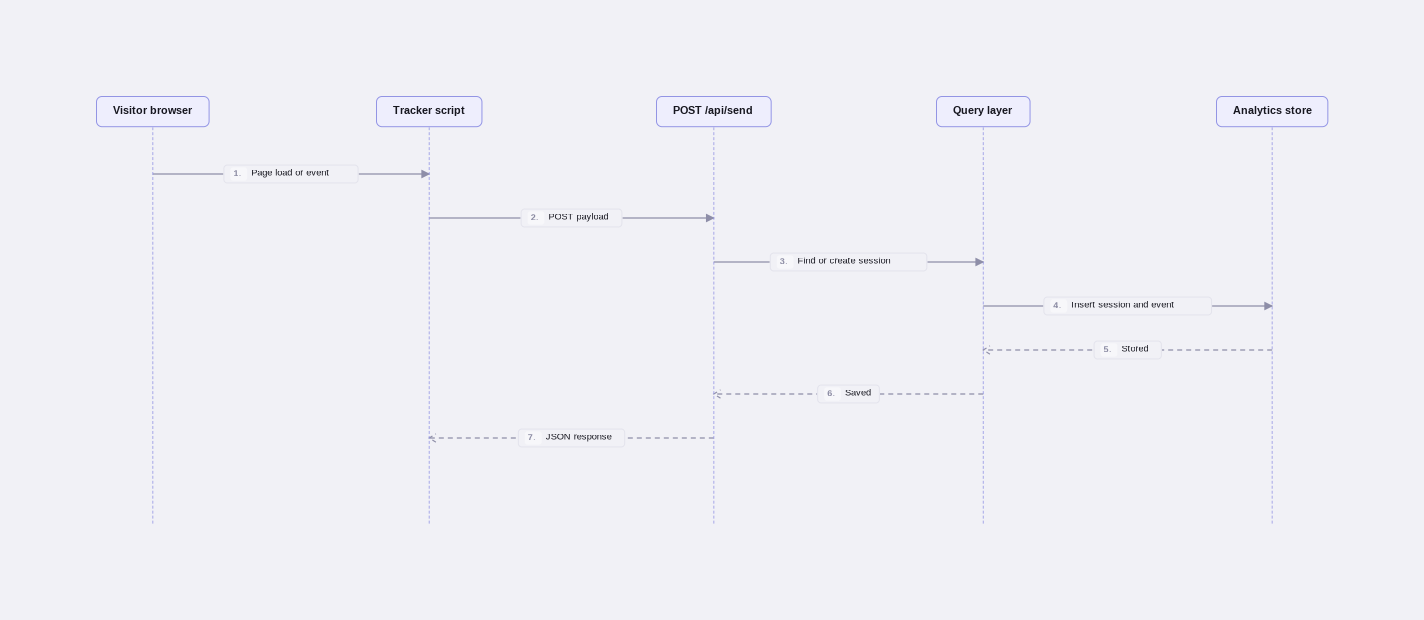
Open the picture for full size (SVG).
Parts
- Visitor browser
- Tracker script
- POST /api/send
- Query layer
- Analytics store
How they connect
- Visitor browser → Tracker script Page load or event
- Tracker script → POST /api/send POST payload
- POST /api/send → Query layer Find or create session
- Query layer → Analytics store Insert session and event
- Analytics store → Query layer Stored
- Query layer → POST /api/send Saved
- POST /api/send → Tracker script JSON response
Draw your own repo
Plotix's agent reads your code and draws its architecture, and the diagram warns you when the code moves on.
Try Plotix